How to add meta tag to your website or Blogger blog
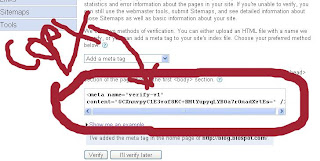
How to add meta tag to your website or Blogger blog 1.Visit google webmaster tools 2. sign in with email id and password 3.Type Your website Url 4. Click On add url 5. Click Next Setp (Verify your site) 6. Click On arrow Key 7. choose Verification method as a Ad meta tag 8.Copy The Code Now Log in Blogger 1. Click On layout 2. Click on Edit Html 3. paste the code between and 4. click on save again logging webmaster tools Click On verify Complete Now Your Site Has Beed Verified With Mata Tag You Can Add Now Site Map How To Add Site Map. Dear Viewers Thanks For Visit My Site Please Bookmark This Site Because I Will Up Date All Search Engine Optimization Tips . Best Of Luck And Enjoy